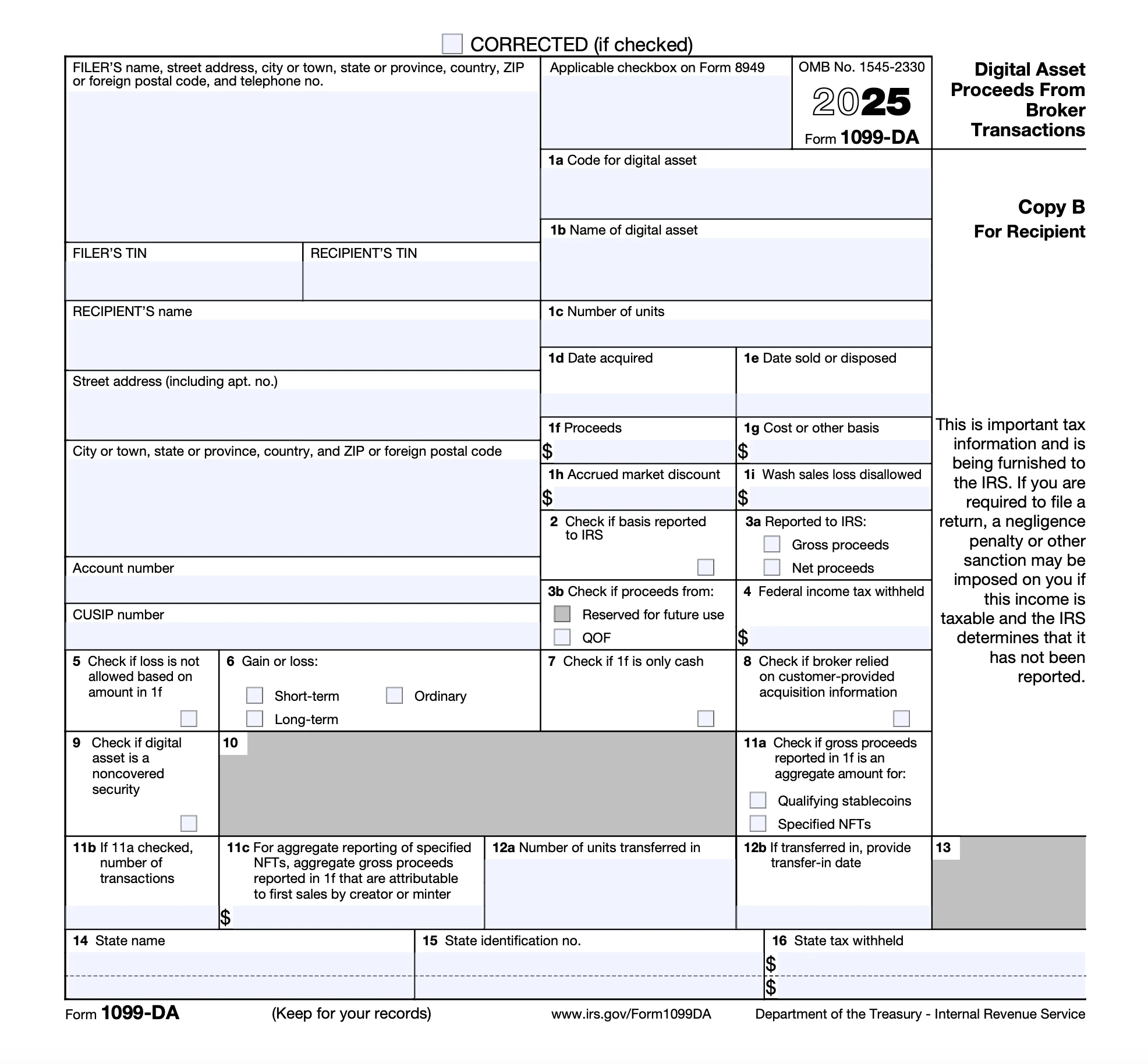
Form 1099-DA
Reports digital asset transactions through a broker during the tax year.
Digital assets can include cryptocurrency (including stablecoins) and NFTs—generally, if you can buy, sell, or trade it via a crypto wallet, it likely counts.

Understand Your Form 1099-DA
Box 1a: Code for digital asset
A code identifying the specific type of digital asset involved in the transaction.
Box 1b: Name of digital asset
The full name of the asset you sold, exchanged, or transferred.
Box 1c: Number of units
Shows the total quantity of the digital asset sold, exchanged, or disposed of.
Box 1d: Date acquired
The date you originally purchased, mined, or otherwise obtained the digital asset.
Box 1e: Date sold or disposed
The date you sold, traded, or otherwise got rid of the asset.
Box 1f: Proceeds
The total gross proceeds from the sale or exchange. This is the total value you received after selling. If you had a loss, it would appear in parentheses as a negative amount.
Box 1g: Cost or other basis
What you paid for the digital asset (adjusted for fees or other costs). This is used to determine your capital gains or losses.
Box 1h: Accrued market discount
Any market discount that has built up since you acquired the asset. A market discount occurs when you buy an asset for less than its face value. This gets taxed as ordinary income rather than a capital gain.
Box 1i: Wash sale loss disallowed
Shows wash sale losses that can’t be claimed due to repurchasing a “substantially identical digital asset” within 30 days. Learn more from IRS on wash sales.
Box 2
Your broker will check this box if your cost basis was reported to the IRS (not required for tax year 2025).
Box 3a
Tells you whether the IRS was given your gross proceeds (total sale amount) or net proceeds (after fees).
Box 3b
If your digital asset transaction involves a Qualified Opportunity Fund (QOF), this box will be checked.
Box 4: Federal income tax withheld
Shows any backup withholding your broker withheld for you. This can happen if you don’t provide your TIN to the broker.
Box 5
Box will be checked if your reported loss doesn’t qualify due to specific IRS rules.
Box 6: Gain or loss
Indicates how your digital asset transaction is treated for tax purposes: short-term, long-term, or ordinary income.
Box 7
If checked, confirms that Box 1f contains only cash proceeds, not other asset types.
Box 8
If checked, your broker used your data (not theirs) to report information like acquisition dates or cost basis.
Box 9
This checkbox identifies whether the digital asset is a noncovered security (meaning the broker isn’t required to report basis information to the IRS).
Box 11a
If your broker is reporting sales of a digital asset eligible for optional reporting, this box indicates the type of digital asset (qualifying stablecoins or specified NFTs).
Box 11b
The total number of digital asset transactions from Box 11a.
Box 11c
Shows the total gross proceeds from an NFT creator’s first sales.
Box 12a: Number of units transferred in
Shows how many digital assets were transferred into the broker’s platform.
Box 12b
Lists the date the broker received the digital assets.
Related Information
IRS Form 1099-DA Explained: Digital Asset Tax Reporting Guide
Learn about the new IRS Form 1099‑DA, how it impacts crypto and digital asset reporting starting TY2025, and how to stay compliant.
Bitcoin and Taxes: What You May Not Know
Find out all you need to know about Bitcoin taxes so you are prepared to report your cryptocurrency earnings on your tax return.
How Do You Report Cryptocurrency on Your Taxes?
Learn how to report income from cryptocurrency such as Bitcoin, Ethereum, and Dogecoin.
A solution for every tax situation
Whether you’re filing for the first time, claiming education credits, or managing retirement income, TaxAct makes it easy to file with accuracy.
Guided support for W-2 earners, retirees, and joint filers
Handles education credits and deductions with ease
Built-in checks help catch common mistakes before you file